Do you need cellular failover?
A second internet path is cheap insurance for a site that cannot go dark. Here is how to tell whether it is worth it, and what "failover" actually buys you.
The case for cellular failover is easy to make and easy to overstate. If an hour offline costs you more than a year of a backup line, buy the backup line. If it costs you an irritated afternoon, it probably is not worth the hardware and the monthly fee.
Work out your number first. A clinic that cannot process claims, a shop whose card terminals stop, a site with remote monitoring that has to report — those have obvious hourly costs. An office where people can hotspot from their phones for an afternoon does not.
Backup, primary, or bonded
"Failover" covers three quite different arrangements, and the differences matter more than the marketing suggests.
Failover proper keeps the cellular link idle until the wired line fails, then switches over. It is the cheapest to run because the SIM sits on a small data plan most of the month. The catch is the switch itself: existing connections drop. VoIP calls end, VPN tunnels re-establish, long downloads restart. Detection and switchover typically takes anywhere from a few seconds to a minute depending on how the router probes the link. For most offices that is entirely acceptable. For a site running softphones it is a noticeable event.
Cellular as primary makes sense where there is no decent wired option — construction sites, pop-up retail, vehicles, rural installations. Here you are not buying redundancy, you are buying the connection itself, and the sizing conversation is completely different: you need to think about monthly volume, not just peak speed.
Bonding runs both links at once and spreads traffic across them, so a failure degrades performance instead of interrupting it. Done properly it needs a router that supports it and, for seamless session survival, an aggregation endpoint on the far side. Peplink's SpeedFusion on something like the Balance 20X is the well-trodden version of this. It is the best experience and the most expensive, because you are paying for two live links plus the bonding service.
Most sites want plain failover. Be honest about which one you are buying — a lot of disappointment comes from people expecting bonded behaviour from a failover configuration.
The antenna matters more than the router
This is the part people skip, and it is the part that decides whether the backup works when you need it.
Cellular routers are usually installed in the worst possible place for cellular reception: a comms cupboard, a basement, the middle of a steel-framed building, next to the wired equipment it is backing up. The internal antennas are then asked to work through a metal enclosure and two masonry walls.
An external antenna on the roof or an outside wall, cabled back to the router, will frequently be the difference between an unusable 2 Mbps and a solid 60 Mbps. If you buy nothing else on top of the router, buy this.
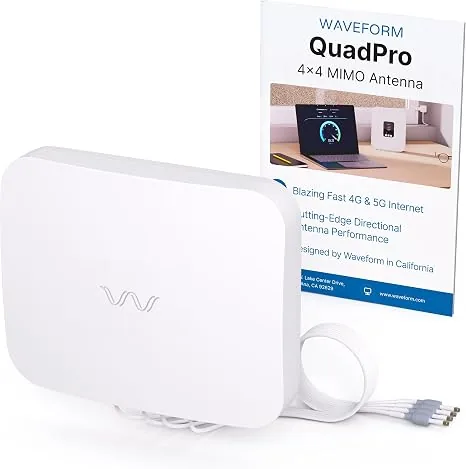
Two practical points. First, match the port count: a 4x4 MIMO modem wants four antenna elements, and feeding it two throws away half the throughput the modem is capable of. A panel like the QuadPro 4x4 exists precisely for that. Second, coaxial cable has real loss at cellular frequencies — keep the run short, use decent cable, and put the antenna on the shortest sensible path rather than the most convenient one. Twenty metres of thin cable can undo the gain you just paid for.
Before you commit to a mounting position, check signal there. Most cellular routers report RSRP, RSRQ and SINR in their status page. RSRP better than −100 dBm and SINR above about 10 dB is a healthy starting point; if you cannot get there, move the antenna before you blame the hardware.
Read the modem class and the SIM story
Two routers with the same "4G LTE" label can differ by a factor of five in real throughput. What you want from the datasheet is the modem category and the carrier approvals.
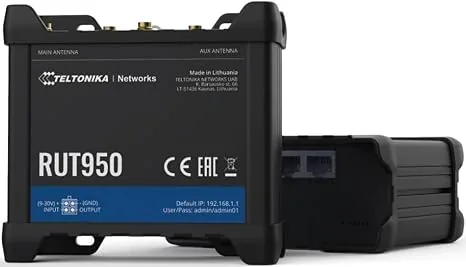
Category tells you the ceiling: Cat 4 tops out around 150 Mbps down, Cat 6 around 300, Cat 12 and above go higher, and 5G sub-6 devices go higher again. Nobody hits the ceiling in practice, but the ratio between categories broadly holds. An industrial Cat 4 unit like the RUT950 is entirely adequate as a failover path for an office that mainly needs email, card processing and a few VoIP channels to keep working. It is not what you want as a primary link for thirty people.
Carrier certification is the one that catches people out. A device can support the right bands and still be refused on a network that only admits approved device identifiers, which is common on US carriers for anything sold as fixed-wireless. Check the specific carrier and the specific model before ordering, not the band list.
Dual SIM is worth having if the site is important. Two SIMs from two different carriers protects you against a single carrier's regional outage, which is a real failure mode — the wired line and the cellular backup going down together in the same storm is exactly the scenario you bought the backup for. Note that most dual-SIM routers are dual-standby, not dual-active: one modem, two SIM slots, switching between them. That is fine for redundancy and does not double your throughput.
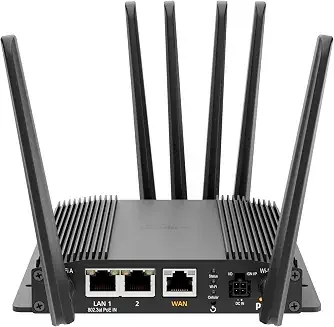
For vehicles and mobile installations, look for a unit designed for it — proper DC input tolerant of vehicle voltage swings, ignition sensing so it does not flatten the battery, and vibration-rated connectors. A mobile 5G router built for that duty will outlast an office box zip-tied behind a seat.
Watch the data plan, not just the hardware
The hardware is a one-time cost. The SIM is forever, and it is where failover projects quietly fail.
A backup line that sits idle needs almost no data — until the day it carries the whole site, when it may move more in eight hours than it normally does in eight months. Plans that throttle hard after a small allowance turn your failover into a slideshow at precisely the wrong moment. Read what happens after the cap: some plans slow to a few hundred kbps, which is functionally offline for a business.
Three things to set up on day one, all of which take minutes and all of which people postpone:
- Test the failover deliberately. Unplug the wired line during a quiet hour and confirm the site actually keeps working — not just that the router shows a cellular connection. Check the things that matter: card terminals, phones, the VPN back to head office.
- Set a data alert. If the wired line fails at 2am on a Saturday and nobody notices until Monday, an uncapped plan can produce a memorable bill. Most routers can alert on usage thresholds.
- Re-test after firmware updates. Failover logic is exactly the kind of thing that gets changed in an update and is never exercised until the outage.
Set a reminder to repeat that first test twice a year. An untested backup is a guess, and it tends to be a wrong one.
If you tell us the site, the carrier and roughly what has to keep running, we will tell you what we would put in and what we would leave out.